
NEW • CAVS 205G PLUS
CAVS 205G Plus
Karaoke Player
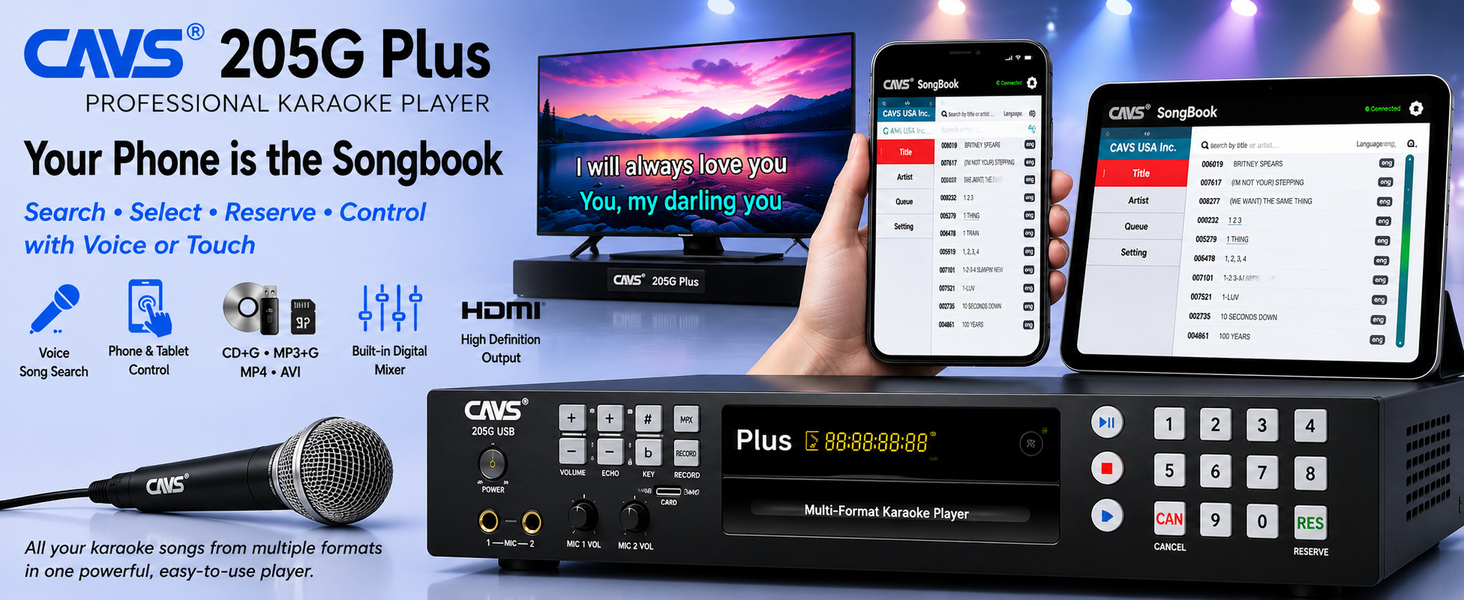
Professional karaoke with phone and tablet control, Voice Command song search, and a one-cable HDMI setup for video, music, and microphone audio.
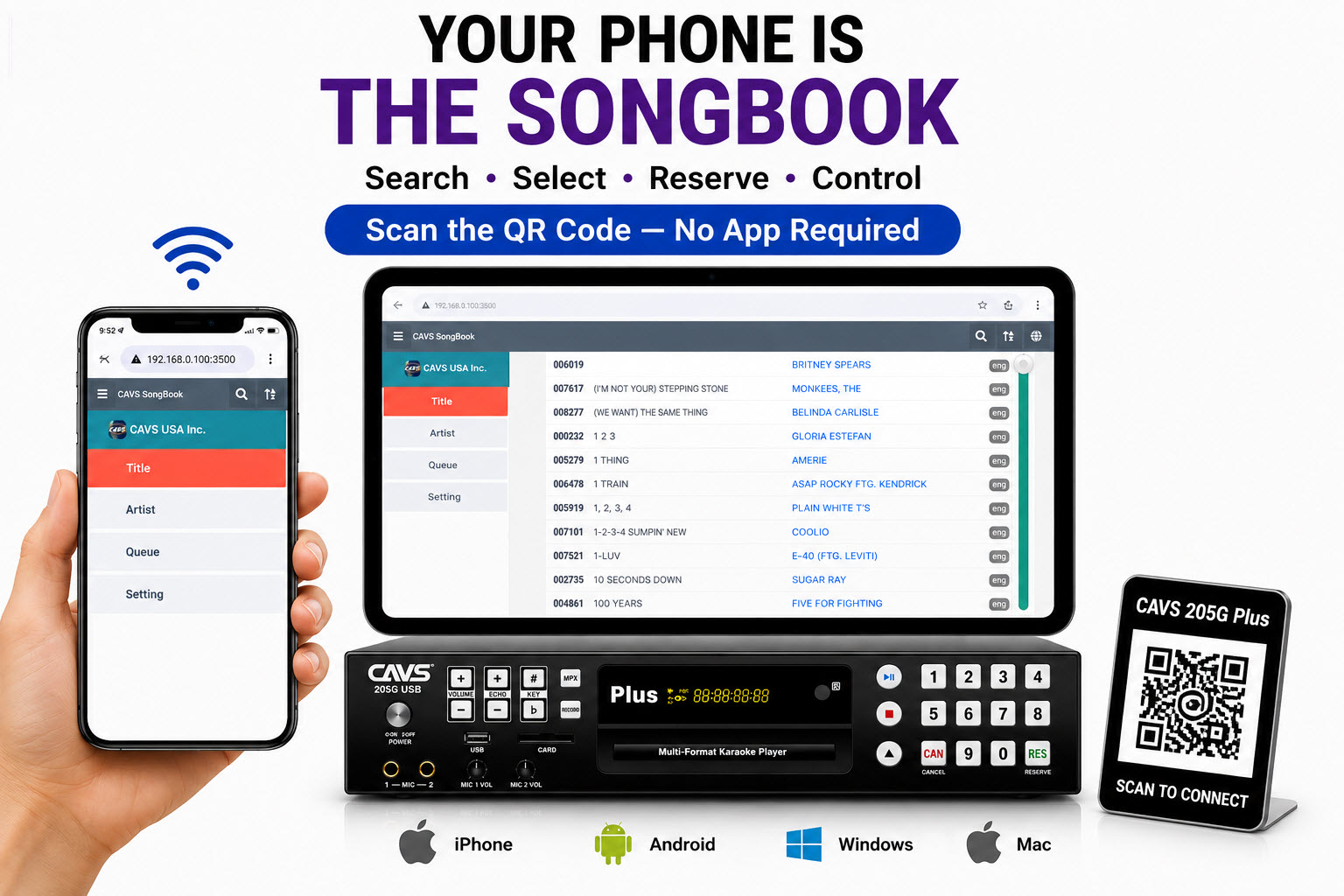
- ✓ Connect phones & tablets — no app required
- ✓ Voice Command search by title or artist
- ✓ HDMI carries video, music & microphone audio
- ✓ Up to 64,000 songs on USB/SD; up to 500,000 on 2 TB drive
- ✓ Front-panel and remote-control operation retained
Network router, QR codes, microphone, remote control, power supply, HDMI cable, RCA cable, rackmount ears, and 200 Golden Songs are included.
PHONE & TABLET CONTROL
Search, reserve, play, pause, cancel, and manage songs from the built-in network songbook.
VOICE COMMAND SEARCH
Find songs by speaking the title or artist name, with support for multiple languages.
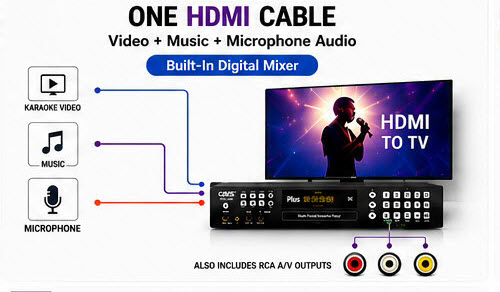
SIMPLE HDMI SETUP
Send video, music, and microphone audio to the TV through a single HDMI cable.



- Play CD+G, Super CD+G, CD, VCD, and DVD discs
- Play MP3+G, Super CD+G, AVI, and MP4 digital files
- Play from discs, USB flash drives, and SD cards
- Connect phones and tablets to search, reserve, play, pause, stop, and cancel songs
- Search by typing or Voice Command
- Control volume, pitch, and echo
- HDMI output combines video, music, and microphone audio
- RCA connections for traditional A/V output
- Extract Super CD+G and CD+G discs
- Record karaoke singing with lyric video
- Score, bill acceptor, and coaxial digital output support
- Network router
- QR codes
- Super CD+G disc with 200 Golden Songs
- Microphone
- Remote control
- UL-approved power supply
- HDMI cable
- RCA cable
- Rackmount ears
- How to setup CAVS 205G Plus player
- How to setup CAVS 205G Plus player (video)
- How to load songs in CAVS 205G Plus player
- How to connect phones and tablets to CAVS 205G Plus player
- How to connect phones and tablets to CAVS 205G Plus player (video)
- How to operate CAVS Songbook interface in phones and tablets
- How to configure CAVS Network Router
- How to setup CAVS 205G Plus player to a bill acceptor (video)
- How to encode a CD+G disc into a new folder
- How to encode a CD+G disc into an existing folder with song files
- How to encode MP3+G or ZIP song files into a new folder
- How to encode MP3+G or ZIP song files into an existing folder with song files
- How to make an external device for CAVS 205G USB player
- How to design multiple folders for quick access in a device for use with CAVS 205G USB player
- How to print a song list
- How to encode a Super CD+G disc
- How to make a Super CD+G disc
- How to print a song list of a Super CD+G disc
- How to encode MP4 or AVI files
- How to make an external device with video song files for CAVS 205G USB player
- How to convert an external device for CAVS DVD-105G, 203G, 305G players to an external device for CAVS 205G USB player
- How to setup CAVS 205G USB player to a bill acceptor (video)
*FOR MORE DETAILS, GO TO MCG Manager program
VIDEO INSTRUCTIONS- How to setup CAVS 205G Plus player
- How to setup CAVS 205G Plus player to a bill acceptor
- How to play CD+G disc
- How to play Super CD+G disc
- How to play MP3+G and MP3+MCG flash drive
- How to load songs to External Device
- How to format External Device to FAT32
- How to use MCG Manager to load songs
- How to use MCG Manager to load MP4 and AVI songs
- How to load video song files for CAVS 205G USB Karaoke Machine
- CAVS 205G USB Karaoke Machine Speed Performance
- How to extract songs of a CD+G disc into CDG+MP3 song files in PC
- How to load CDG + MP3 song files into an external device using Copy & Paste for CAVS 205G USB Karaoke Machine
- How to customize an external device for CAVS 205G USB Karaoke Machine
- How to keep the old song numbers when making an external device with the MCG Manager program for CAVS 205G USB Karaoke Machine
- How to add more songs into an external device for CAVS 205G USB Karaoke Machine
- Upgrade CAVS Songbook Firmware:
Jan 12, 2025:
Songbook_upgrade.zipUpgrade Log:
20250112-Shuffling of reserved songs debugged
20241211-Control synch debugged
20241121-Checksum added for quick loading
20240613-Auto search and clear feature debugged
20240610-Search feature debugged
20240522-Options to disable Controls and Reserve
20240510- Fixed the Refresh bug in Songbook.
20240509- Fixed the Pause bug in Songbook.
20240501- Expanded the internal buffer size to 4MB to accomodate over 100,000 songs. - Download the upgrade zip file into your phone or tablet.
- Connect the phone or tablet to the 205G Plus player administration page, 192.168.0.100:3500\admin.
- Press the Setting button on the left column.
- Press the Browse button and select the upgrade zip file.
- Press the Upgrade button to start upgrading and when done, press OK to the “Upgrade successful” popup message.
- Wait for the Songbook page to restart.
- Upgrade CAVS 205G Plus Firmware:
Dec 11, 2024:
AP_ROMH.zip
Upgrade Log:
20241211-Song Reservation simplified
20241121-Checksum added for quick loading
20240924- Supporting MP4 and AVI song files in MCG Manager program
20240723- Bug fix in DVD disc playingUpgrade Instruction:
- Download the Upgrade zip file from the link above.
- Unzip the file to find AP_ROMH.BIN file inside.
- Copy the AP_ROMH.BIN file onto a USB flash drive or a SD card which is formatted FAT32.
- Connect the CAVS 205G USB player to a TV and power on the TV and the player.
- Insert the USB flash drive or the SD card into the CAVS 205G Plus player.
- Using the remote control, press MODE and select F. Drive. A window SMART UPGRADE will appear on the TV.
- Select “< o >” and press Enter.
- Upgrade will begin. DO NOT POWER OFF DURING UPGRADE. Powering off during Upgrade can cause serious damage to the player which is not covered under CAVS warranty.
- When done, the disc tray will open. Take out the USB flash drive or the SD card with the upgrade BIN file from the CAVS 205G Plus player.
- Power off the CAVS 205G Plus player.
- Power on the CAVS 205G Plus player. The disc tray will close and the new firmware will be activated.
Upgrade Instruction:
PROFESSIONAL, COMPACT DESIGN
The CAVS 205G Plus is designed for both home and professional karaoke. Large back-lit front-panel buttons are easy to operate in low-light environments, while the phone and tablet interface gives singers a simple way to browse and control songs.
PHONE & TABLET CONTROL
The included network router and QR codes make connection simple. After the player and router are powered on, guests can scan the QR code with a phone or tablet and open the songbook interface.
From the interface, users can search, reserve, play, and manage songs, including Voice Command search by title or artist. Front-panel buttons and the remote control remain available whenever you prefer traditional operation.
LOAD THOUSANDS OF SONGS
Play songs from discs, USB flash drives, and SD cards. With CAVS MCG Manager freeware, you can prepare media with up to 64,000 songs on a USB flash drive or SD card, or up to 500,000 songs on a 2 TB hard drive.
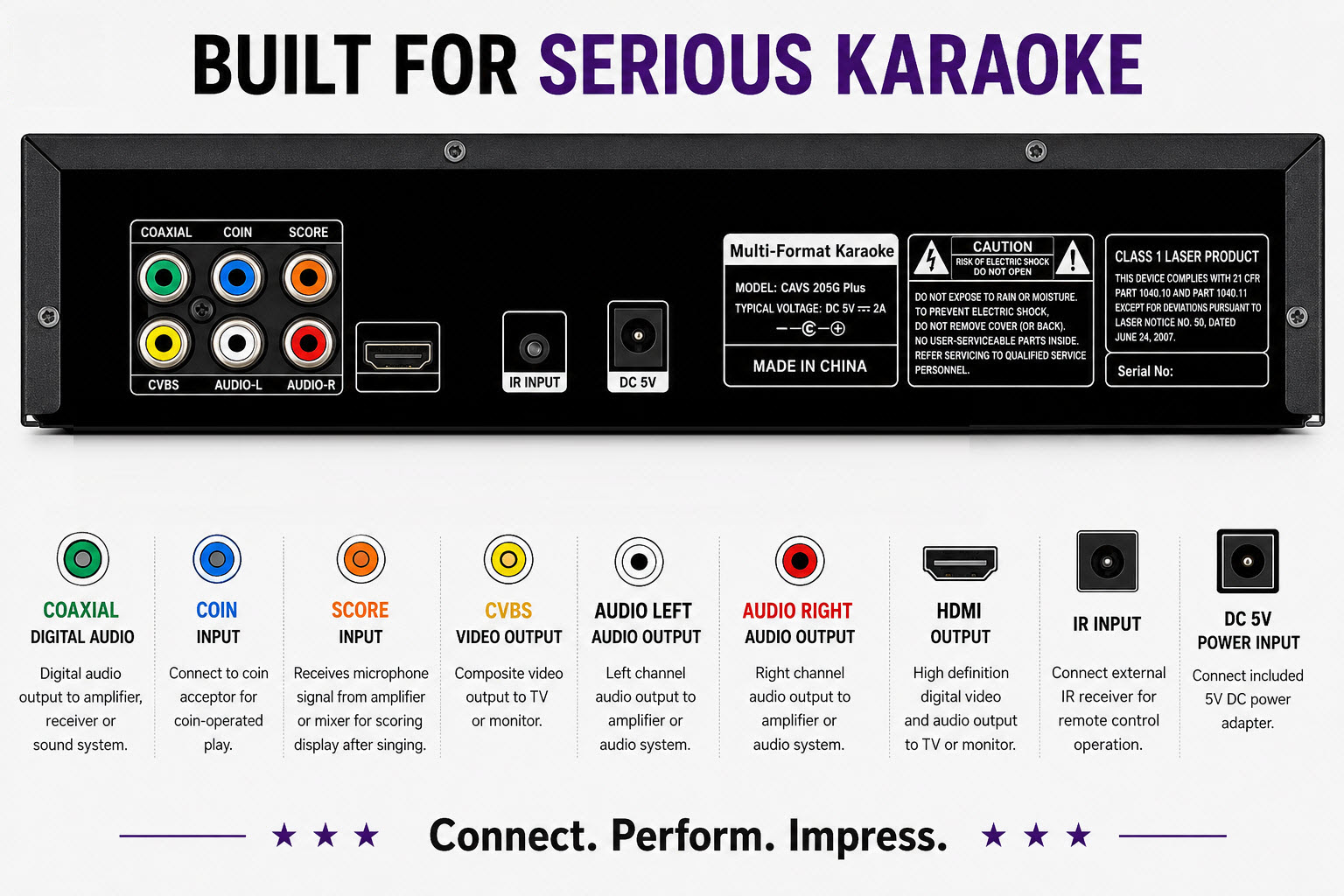
MODERN + TRADITIONAL CONNECTIONS
The rear panel supports both modern and traditional karaoke installations:
- HDMI: Carries video, music, and microphone audio through one cable.
- RCA: Provides traditional composite video and stereo audio output.
- COAXIAL: Digital audio output for compatible mixers or sound systems.
- COIN: Supports connection to a bill/coin acceptor for pay-per-song or pay-per-time operation.
- SCORE: Supports singer scoring for contests and events.
Now on Sale — $699
Includes 200 Golden Songs + Free Shipping
USB Flash Drive — 256 GB
-
64,000-song capacity
-
Pre-formatted FAT32
-
SD Card — 256 GB
-
64,000-song capacity
-
Pre-formatted FAT32
-
USB SSD 2TB
-
500,000 Song Capacity
-
Pre-formatted FAT32
-
CAVS Network Router
-
SSID & WPA Preset
-
DHCP Reservation
-
QR Codes
-
Wi-Fi x 12, URL x 12
-
Sticker Label 2" x 2"
-